
TOY CRANE / How to play
How to Play TOY CRANE — Beginner’s Guide
TOY CRANE plays like a real arcade claw machine in 3D. This guide walks you through the screen, the controls, levels and items so you can win your first plushie fast.
1. The screen
The game opens in the lobby. At the top you see your level, your coins (wallet) and the time until the next free refill. The big Start button takes you to the machine. Below it are the Claw Shop, My Prizes (bag), Season Ranking, the Coin Shop and the Piggy Bank.
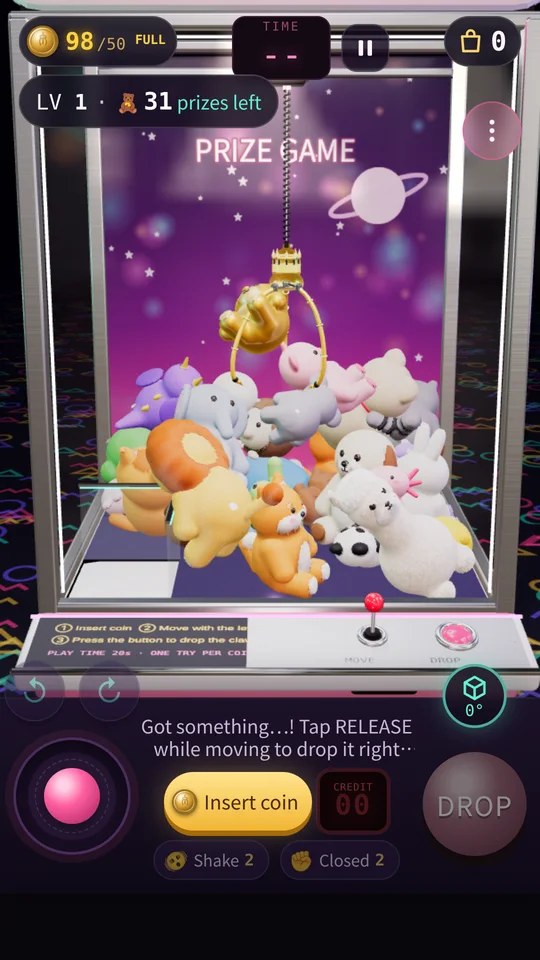
At the machine you look through the glass at a pile of plushies, with a control panel underneath: the lever (joystick) on the left, the Insert Coin button and a digital CREDIT display in the middle, and the DROP button on the right. Above DROP sits the 0°/90° button for switching between front and side views, and the items (Shake, No-Open) sit in the bottom row.
2. Coins and credits
Just like at the arcade, you insert coins first. Every tap on Insert Coin drops one coin into the slot and the CREDIT counter goes up by one. Tap quickly to stack several plays; when one play ends the next starts automatically. You can load up to 99 credits at once.
After you stop inserting, a READY → GO! call starts the round. The game never starts while you are still tapping, so you won’t waste a coin by bumping the lever. If you want to stop, open Pause (Ⅱ) and choose Quit: unused credits go back to your wallet.
3. Aim and DROP
Move the claw with the lever until it is right above the prize you want. When the TIME counter at the top reaches zero the claw drops by itself, so don’t take too long. Press DROP: the claw descends until it touches a plushie or the floor, closes, rises and carries the prize to the chute.
While it carries, DROP turns into RELEASE. Tap it to let go right there — handy for parking a prize on the chute lip or dropping it onto the pile to rearrange things.
4. The 0°/90° switch is the key skill
You can drag the screen to look around the machine, but the button you will use most is 0°/90° above DROP. Each tap snaps exactly between the front view (0°) and the side view (90°). Line up left–right from the front, then check depth from the side — exactly what you would do by leaning around a real machine. On PC the F key does the same.
The back prong of the claw has a red tip, so you can always tell which way the claw is facing.
5. Items: Shake and No-Open
- Shake rocks the whole machine hard for a few seconds, loosening plushies that are wedged together and sometimes rolling one toward the chute.
- No-Open sends the claw down with its prongs closed so it presses and pushes instead of grabbing. It is the best way to shove a plushie that is hanging on the chute lip.
You earn items from level clears and the shop. Save them for the moments that matter.
6. Levels
Each level has a fixed pile of prizes with no respawns: win them all to reach the next level. When the “left” counter in the top-left hits zero, you clear the level. Levels 1–3 contain only small plushies so you can learn the feel; later levels mix in medium and large plushies plus balls, boxes and toys. Every 10th level is a boss board, every 50th gives a milestone bonus, and the levels go all the way to 500.
Clearing a level sends bonus coins flying into your wallet, and watching an ad doubles the bonus. Until level 3 you can try the top-tier Golden Titan claw for free — a great way to learn.
7. Where do prizes go?
Prizes go into My Prizes (your bag) and each new type is recorded in the Collection. You can sell bag prizes for coins (1–3 by size; golden plushies sell for 10 medium / 20 large). Identical prizes are grouped and you can sell many at once. Selling never removes a type from your collection.
8. Keep going
Each claw behaves differently — see the Claw Guide. To improve your win rate, read the strategy guides, and check the FAQ for anything else.